Image to Text AI — Free Online OCR Converter
Free · No registration · Instant results
Free image to text converter powered by AI. Extract text from any image — screenshots, photos, scanned docs, PDFs. Supports 200+ languages with 99% accuracy. No sign-up needed.
Drag & drop an image or click to upload
Click to select file
Paste with Ctrl+V (Mac: ⌘V)
Processing image, please wait...
What can Image to Text AI do?
Perfect for work, study, and everyday life
Screenshot to Text
Grab text from screenshots, meeting notes, and chat messages. Works instantly in your browser.
Scan Documents
Turn scanned PDFs, contracts, and book pages into editable text. Works with even old, low-quality scans.
ID & Card Recognition
Pull text from IDs, business cards, and bank cards automatically. Quick data entry made easy.
Class Notes
Turn handwritten notes, textbooks, and exam papers into text. Great for studying and archiving.
Receipt Processing
Pull info from receipts and invoices. Turn them into spreadsheet-ready data for expense tracking.
Multilingual Support
Works with 200+ languages including Chinese, Japanese, Korean, French, and more. Mixed-language docs? No problem.
Who uses Image to Text AI?
Perfect for professionals and students alike
Remote Work
Quickly extract key info from meeting screenshots and project docs to boost collaboration
Academic Research
Extract data and citations from papers and documents - no more manual typing
Finance & Accounting
Digitize invoices, receipts, and bills - expense tracking made easy
Sales & CRM
Quickly input business cards and client info into your CRM system
How to use Image to Text AI?
Three simple steps to convert image to text
Upload Image
Drag & drop or click to upload. Works with PDF, PNG, JPG, and 60+ other formats. No sign-up needed.
AI Processing
Our AI detects text, handles multiple languages, and keeps your layout intact. Even handwriting gets recognized.
Get Results
Copy with one click, download as TXT or DOCX, or share directly. Images are deleted immediately after processing.
Why choose ImageToText AI?
Cutting-edge technology for outstanding results
Image to Text AI vs Traditional OCR
See the AI difference in image to text conversion
Advanced Image to Text AI Capabilities
This free image to text converter handles more than basic extraction
Printed Text
Highly accurate recognition for common fonts like Times New Roman and Arial.
Handwriting
Class notes, meeting minutes, and signatures — intelligently recognized.
Math & Science
LaTeX formulas and chemical equations — recognized and output as editable text.
Table Extraction
Tables detected and preserved automatically. Export to Excel with proper formatting.
Multilingual
Works with English, Chinese, Japanese, Korean, French, German, and 200+ other languages.
Privacy Protection
Your data stays yours. Sensitive info like IDs and bank cards are automatically blurred.
Complex Backgrounds
Perspective correction, tilt adjustment, and shadow removal — works even with difficult images.
Image to Text AI User Reviews
See why our image to text converter is trusted worldwide
"I process dozens of contract scans daily. This tool has boosted my efficiency by at least 5x! The accuracy is way better than any other tool I've tried."
"As a grad student, this is a lifesaver! I can convert textbook screenshots and paper PDFs directly to text - no more typing everything out by hand."
"As a content manager, I'm constantly organizing reference materials. Used to take all day to input manually, now it takes minutes and keeps the original formatting!"
The Rise of AI Image to Text Technology
1 OCR Industry Background
OCR (Optical Character Recognition) has come a long way in nearly a century. From early printed text recognition to today's AI-powered intelligent systems, OCR has undergone revolutionary changes. According to Grand View Research, the global OCR market exceeded $10 billion in 2023 and is projected to grow at 15.2% CAGR through 2030.
Traditional OCR relied on rule engines and template matching, limited by fonts, layout, and image quality. With AI advancements, especially CNNs and RNNs, accuracy has improved dramatically - handling complex scenes, multilingual text, and even handwriting.
As digital transformation accelerates globally, demand for document digitization is exploding. From government archives to enterprise invoice processing, OCR is penetrating every industry.
2 5 Pain Points of Traditional OCR
Problem 1: Messy Layouts — The most frustrating issue. Text often comes out jumbled - paragraphs reversed, multi-column turned into single blocks. A structured document becomes a mess requiring extensive reformatting.
Side-by-Side Comparison — Same image processed by different tools:
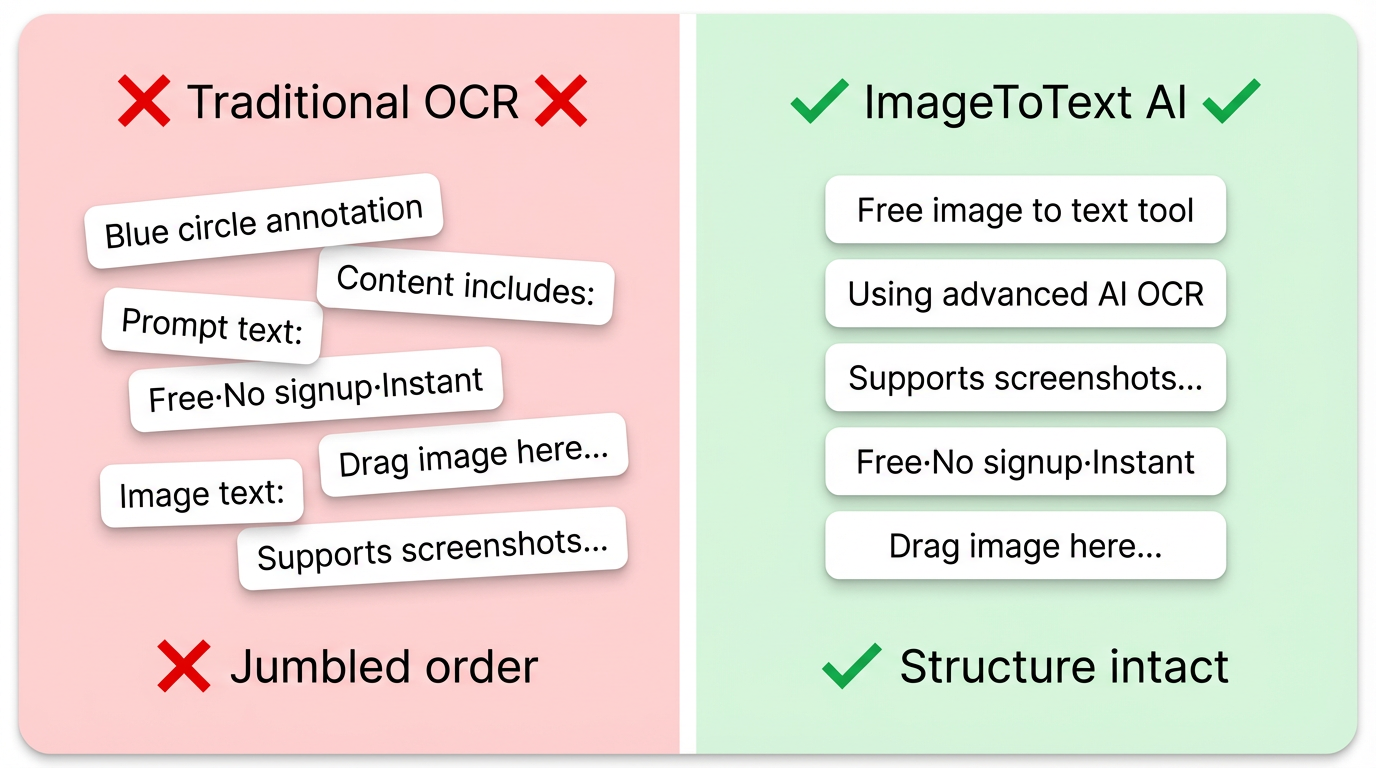
Content includes:
Prompt text:
Free·No signup·Instant
Drag image here...
Image text:
"Supports screenshots..."
❌ Jumbled order
Using advanced AI OCR,
supports screenshots...
Free·No signup·Instant
Drag image here...
✓ Structure intact
Problem 2: Lost Table Structure — Traditional OCR struggles with tables. Results turn tables into scattered text, with merged cells and borders lost. Want to recreate Excel? Start drawing from scratch.
Problem 3: Inconsistent Accuracy — High image quality is essential. Clear scans work okay, but tilted, blurry, watermarked images cause accuracy to plummet. Results often contain typos and merged symbols requiring heavy manual correction.
Problem 4: Weak Complex Scene Handling — Handwritten text is almost off-limits for traditional OCR. Multilingual docs, mixed font sizes, and formulas all produce poor results.
Problem 5: Poor User Experience — Download, install, activate, configure... by the time you're done, half an hour is gone. Plus, compatibility issues are common.
3 ImageToText AI Smart Solutions
🧠 Smart Layout Recovery
AI analyzes document structure - multi-column layouts, paragraph order, and image positions intelligently restored. Results match the original layout perfectly.
📊 Table Structure Preserved
Not just content - table structure is intelligently restored. Merged cells, borders, and headers handled. Export directly to editable Excel.
🔧 Adaptive to Complex Images
Perspective correction, tilt adjustment, shadow removal, low-light enhancement... AI auto-preprocesses "difficult" images. Blurry, creased, or stained images still recognized accurately.
⚡ Zero Learning Curve
No download, no registration. Just open the webpage. 3 steps: Upload, AI Process, Get Results. Use anywhere, anytime.
4 Core Technical Advantages
End-to-End Deep Learning — Our OCR uses end-to-end architecture. From image preprocessing and text detection to sequence recognition and post-processing, the entire pipeline runs on deep neural networks. This avoids error accumulation issues in traditional pipelines.
Intelligent Layout Analysis — One of our core technologies. AI identifies document logical structure including multi-column layouts, paragraph hierarchy, and table regions. Original reading order preserved.
Proprietary Text Detection — We developed dedicated text detection models for text at any angle or curved surface. Accurately locates text even in dense text, small fonts, or complex backgrounds.
Attention Mechanism — For character recognition, we employ attention mechanisms that help the model focus on contextual relationships. Particularly effective for blurry characters, mixed languages, and punctuation.
5 Future OCR Industry Trends
Trend 1: Deep AI Integration — Future OCR is more than text extraction. Recognized text can be analyzed for semantic meaning, content understanding, and information extraction.
Trend 2: Edge Deployment — For privacy and performance, more OCR will run on user devices. Through model quantization and pruning, lightweight OCR can run on phones for offline recognition.
Trend 3: Vertical Specialization — With general OCR competition intensifying, specialized OCR for specific industries is the new frontier. Medical receipts, legal documents, and financial reports are spawning customized solutions.
Trend 4: Democratization — As ImageToText AI demonstrates, high quality OCR is moving from premium to mainstream. We believe everyone deserves access to AI-powered convenience. We offer free basic credits to make technology accessible to all.
Why trust Image to Text AI?
Image to Text AI - Frequently Asked Questions
Everything you need to know about our image to text converter
Basic features are completely free. No sign-up needed — just upload and get your text in seconds. We offer daily credits for personal use and light office work. Need more? Paid plans are available with transparent pricing.
Works with PDF, JPG, PNG, BMP, GIF, TIF, TIFF, WEBP, SVG, ICO, HEIC, HEIF, and 60+ more formats. Max file size: 10MB.
No. Images are only transmitted between your browser and our server during processing. Everything is deleted within minutes. We never store your images or results on any server.
98%+ accuracy for clear printed text. Accuracy may drop slightly for blurry images, complex backgrounds, or messy handwriting. For best results, use clear, well-lit photos.
Yes, handwritten text works too. Class notes, meeting minutes, signatures — all can be recognized. Neat handwriting gives the best results.
Currently one image at a time. Use it as many times as you need — there's no daily limit. For higher volume needs, check out our API plans.
Works with 200+ languages — English, Chinese, Japanese, Korean, French, German, Spanish, Russian, Arabic, and more. Mixed-language documents are handled automatically.
Clear images work best. If your screenshot is blurry, try increasing the resolution or taking a new one. Results will be better with higher quality images.
Easy! Take a screenshot or save an image from anywhere, then upload it to our site. You can also paste a screenshot directly from your clipboard.
Yes. Just upload the PDF and we'll detect and extract text from any images embedded in it. No extra steps needed.
Yes. Images are processed only during the task and deleted within minutes. Nothing is stored or shared with anyone.
Image to Text AI - Tips for Better Results
Keep it Clear
Make sure text is legible. Blurry or motion-blurred photos will reduce accuracy
Even Lighting
Photograph in even lighting, avoid glare or shadows
Straight On
Keep your phone parallel to the document to reduce distortion
High Resolution
Use higher resolution images to preserve more text detail
Start Using Image to Text AI - Convert Images to Text Free
No registration needed - just open and use. ImageToText AI supports pdf, jpg, jpeg, png, bmp, gif, tif, tiff, webp, svg, ico, heic, heif, cr2, crw, nef, nrw, arw, rw2, orf, raf, pef, rwl, sr2, srw, dng, ai, eps, ps, psd, wmf, emf, xps, oxps, djvu, svgz, hdr, exr, raw, fit and 60+ more formats.
Try Image to Text AI now